
Summary
Low vision affects tens of millions of seniors worldwide, and for many of them, the devices available even five years ago simply were not up to the job.
In 2026, a new generation of AI-powered assistive technology is reshaping what is possible.
This guide breaks down the best AI low vision devices for seniors available right now, what separates the strong options from the marketing-heavy ones, and why Vision Buddy has emerged as a standout choice for older adults who want to watch TV, read, and live independently without relying on a family member for every visual task.
Why Seniors Face Unique Low Vision Challenges
Vision loss in older adults is rarely just about seeing less clearly.
It comes packaged with a cluster of other realities that make the challenge more complicated than a simple prescription adjustment can fix.
The most common causes of low vision in seniors are age-related macular degeneration (AMD), glaucoma, diabetic retinopathy, and cataracts.
Each of these conditions creates a specific pattern of vision loss. AMD destroys central vision, making it hard to read, recognize faces, or watch television. Glaucoma eats away at peripheral vision until the field of view narrows to a tunnel. Diabetic retinopathy creates irregular patches of blur and distortion.
These conditions often occur in combination, and they frequently progress alongside other age-related health issues like arthritis, tremors, cognitive changes, and reduced stamina.
This matters because the best AI low vision devices for seniors have to account for the whole person, not just the eye condition.
A device that requires fiddly button sequences is not going to serve someone with arthritic hands.
A device that needs daily software updates is not ideal for someone who finds new technology intimidating.
A device that is heavy and cumbersome to put on is going to end up in a drawer.
Seniors also spend more time on specific activities than younger low vision users, particularly watching television, reading letters and books, reviewing medical documents, and maintaining social connections through video calls.
The best devices have to perform reliably and comfortably across all of these activities, not just pass a lab test.
What Makes a Device Truly Senior-Friendly?
Before comparing specific products, it helps to define what actually makes an AI low vision device work well for older adults.
There are five criteria that matter most.
Simplicity of setup and daily use:
If a device requires extensive configuration, multiple remote controls, or technology literacy to operate, most seniors will abandon it quickly. The best devices turn on, connect, and work without a learning curve.
Comfort for extended wear:
Seniors watch television for longer periods than most demographics. A device that creates neck strain, forehead pressure, or ear discomfort after thirty minutes is not a practical daily use tool.
Real TV watching capability:
This is non-negotiable. Television is one of the primary leisure and social activities for older adults. A low vision device that cannot handle live TV, cable, and streaming is missing a critical use case.
Reading performance:
From medication instructions to personal mail to books, reading is essential. Devices need to handle variable text sizes, physical documents, and screens with equal reliability.
Support and community:
Seniors benefit from responsive customer support, easy troubleshooting, and optometrist involvement in the product design. A device backed by a knowledgeable support team is a much safer investment.
The Best AI Low Vision Devices for Seniors in 2026
Several companies are competing in this space in 2026.
The main players that come up repeatedly in discussions about AI low vision devices for seniors include Vision Buddy, OrCam, Envision Glasses, and eSight.
Each has a different design philosophy and a different target use case.
OrCam products use a small camera attached to the side of regular glasses and deliver audio feedback about text and faces.
The approach is less intrusive but it converts visual information to audio rather than enhancing what you see. For seniors who still have meaningful residual vision and want to use it, audio-only feedback is often not satisfying.
Envision Glasses are AI-powered smart glasses that focus heavily on scene description, navigation, and text reading through a voice interface.
They are designed for a more active user and are priced at approximately $3,500. The feature set is impressive but the complexity and price point can be barriers.
eSight produces head-mounted electronic magnification devices that have been in the market for several years.
Their devices are effective but carry a significant price tag that puts them out of reach for many seniors without insurance support.
Vision Buddy has carved out a specific and compelling position: specifically engineered for the home-based activities seniors care most about, with a price point more accessible than most competitors.
Vision Buddy VB Mini: Lightweight Freedom
The VB Mini is Vision Buddy’s lightest device, weighing just 0.12 pounds.
It is designed for seniors who want a comfortable, wearable low vision aid that handles the full range of daily activities without feeling like equipment.
The VB Mini connects to the TV Hub for wireless TV watching, supports Computer Link for magnified computer and tablet viewing, and pairs with the CCTV Mini for hands-free reading at a desk.
Up to 10x adjustable magnification handles everything from reading fine print to watching a face across the room.
Battery life is approximately 2.5 hours standard, with an external battery option extending that to 8 hours, which is enough for a full afternoon and evening of viewing.
The adjustable lens up to 2 diopters allows personalization for each eye independently.
The no-training-required design is genuinely important for seniors. Multiple users describe setting up the VB Mini on the day of delivery without technical help. That is not a trivial achievement in this category.
Vision Buddy VB 4 Max: The All-in-One Powerhouse
The VB 4 Max is Vision Buddy’s flagship device and one of the most comprehensive AI low vision devices for seniors available today.
It pairs a 16-megapixel Sony AI camera with a 4K per-eye display, delivering an exceptionally clear and magnified image for television, reading, and everyday visual tasks.
The TV Hub connects to any cable box or streaming service and transmits the video wirelessly to the headset.
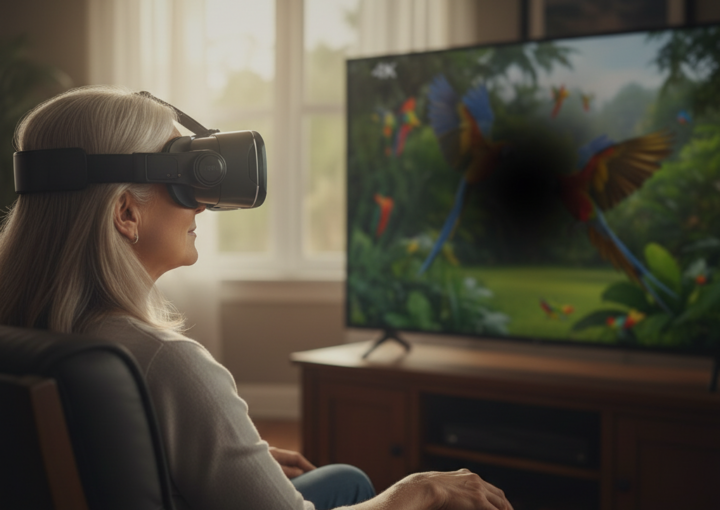
This means seniors can watch their favorite programs independently, from a comfortable chair, at whatever viewing angle works best for them, with a magnified and contrast-adjusted image delivered directly to their eyes.
The VB 4 Max weighs approximately 1.1 pounds with an external battery that provides around 6 hours of use. The 98-degree field of view is wide enough to feel natural, and the up to 10x zoom handles detailed reading and distance viewing alike.
The VB companion app, co-created with optometrists, allows personalized configuration of contrast, brightness, color filters, and reading modes.
How Vision Buddy Compares to Other Options
When comparing the best AI low vision devices for seniors side by side, a few differences consistently emerge.
On TV watching capability, Vision Buddy stands alone.
No other wearable low vision device includes a dedicated TV Hub system designed specifically for this use case. This is not a minor distinction for seniors whose primary leisure activity is television.
On ease of use, Vision Buddy’s no-training-required design compares favorably to more complex devices like Envision Glasses, which require familiarity with voice commands and smartphone integration for full functionality.
What Seniors and Caregivers Should Consider Before Buying
Anyone researching AI low vision devices for seniors should work through a few key questions before purchasing.
What is the primary activity?
If TV watching is the main goal, Vision Buddy’s dedicated TV Hub system is a decisive advantage. If outdoor navigation is the priority, the evaluation should weigh different factors.
Has a low vision specialist been consulted?
A professional assessment can identify which features are most beneficial for a specific vision loss pattern. This shapes the choice significantly.
What support is available after purchase?
Look for responsive customer service, setup assistance, and clear documentation. For seniors who need help with technology, post-purchase support is as important as the device itself.
Insurance, Veterans Benefits, and Financial Help
Cost is a real concern for seniors on fixed incomes. A few options may help reduce the effective cost of AI low vision devices.
Some insurance plans offer partial reimbursement for assistive technology, particularly when recommended by an ophthalmologist or optometrist.
Medicare does not typically cover electronic low vision aids directly, but supplemental insurance plans vary. It is always worth submitting a claim with documentation.
Veterans with service-related or age-related vision loss may qualify for assistive technology support through the VA.
Vision Buddy has an established relationship with the VA and lists veterans as a specific customer group on its website.
Final Thoughts
The market for AI low vision devices for seniors has matured significantly in 2026.
There are now real choices, and the technology genuinely works. The decision comes down to matching the right device to the right combination of vision profile, daily activities, ease-of-use needs, and budget.
For seniors who primarily want to watch TV independently, read their mail and books, and manage daily household tasks without asking for help, Vision Buddy is among the strongest options available.
Its combination of clinical validation, dedicated TV watching capability, optometrist-developed personalization, and accessible trial program sets it apart in a crowded field.