Maya Williams
Today’s workforce is increasingly digital and demanding, placing unique pressures on those with visual impairments. Low vision professionals face obstacles in productivity, collaboration, and independence, whether they’re in the office or working remotely.
But Vision Buddy offers a breakthrough.
As low vision glasses for working, they deliver ergonomic comfort, multiple viewing modes, and easy connectivity designed for modern work life.
In this blog, we explore why Vision Buddy stands apart in assistive technology and why it’s becoming an essential tool for remote work low vision glasses. You’ll discover how it elevates productivity, confidence, and comfort every working day.
Millions rely on assistive devices to stay productive. Whether you’re drafting reports, analyzing spreadsheets, or collaborating online, even a minor visual impairment can slow you down, and make the workday exhausting.
For low vision professionals, normal tools often feel like barriers:
Even with screen readers or magnifiers, many still yearn for a device designed for daily use. That’s where Vision Buddy shines.
Imagine a typical remote workday:
Tasks you once took for granted now feel like obstacles. Traditional assistive technology may have helped, but often feels clunky, limited, or impractical for real work life.
Assistive technology plays a critical role for low vision professionals by:
Smart devices and assistive technology now offer solutions, from screen readers and magnifiers to voice command tools.
However, many of these aids lack the versatility and real-time, hands-free support that today’s rapidly changing professional landscape demands.
Modern low vision glasses for working bridge the gap between conventional aids and high-performance professional demands. Unlike traditional magnifiers or fixed lenses, these glasses should:
The need for effective low vision glasses for working is even greater in remote and hybrid work models, where professionals must manage their own accessible workspace, read from multiple devices, and participate in video meetings, all without in-person assistance
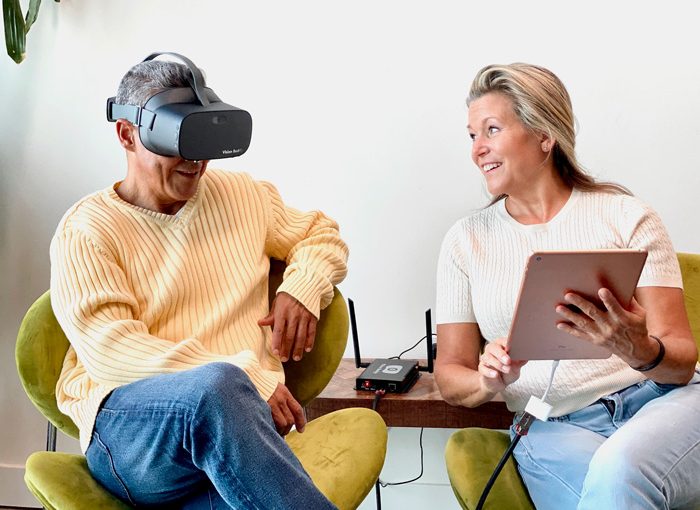
Vision Buddy was created by professionals for professionals. Unlike single-task magnifiers or awkward headsets, Vision Buddy is designed to blend into your workday.
Weighing around 400 g, Vision Buddy feels more like eyeglasses than a wearable computer. Its cushioned frame and adjustable straps mean it can be worn all day without fatigue, unlike heavier alternatives.
For professionals needing low vision glasses for working, this flexibility is transformative.
Vision Buddy connects to your devices directly, no apps or complicated pairing required. HDMI or wireless streaming from laptops, tablets, or desktop monitors provides a seamless view of your screen.
Forget fiddling with settings or looking aimlessly, Vision Buddy uses simple buttons and optional voice control. You can zoom, adjust contrast, or switch modes without exiting your workflow, keeping you focused all day.
Let’s look at real-world professional situations where Vision Buddy can shine.
Imagine reading a detailed spreadsheet clearly, analyzing presentations slide by slide, or reading reports without having to rely on zooming or reading lines out loud. Vision Buddy ensures that every document is comfortably visible.
Need to follow slides during a Zoom call? With Vision Buddy, you can see shared screens clearly. And since you’re not leaning in, you’re more stable on camera, making meetings smoother and more polished.
It’s normal to switch between laptop, tablet, phone, and TV. Vision Buddy bridges that gap, it serves as your personal all-in-one display without confusing menus or device switches.
Tired of reading menus, contracts, or printed materials with loupe readers? Vision Buddy’s reading mode provides crisp text with improved contrast, making everyday tasks more efficient and less tiring.
Feature | Vision Buddy | Screen Magnifiers | CCTV Magnifiers | Mobile Magnifier Apps |
Wearable Design | Hands-free & lightweight | Hand-held, single-task | Stationary | Mobile, two-handed |
Multi-mode Viewing | ✅ Yes | ❌ No | Fixed view | Limited |
Zoom + Contrast Built-in | ✅ Yes | Basic features | Advanced, bulky | Basic |
Virtual Meeting Support | Full-screen clarity | Limited field of view | Bulky & immobile | ❌ No |
Device Connectivity | Laptop, tablet, via HDMI/USB | Separate optical pieces | Tethered to monitor | Phone-based |
Vision Buddy is purpose-built for modern work. Unlike remote work low vision glasses, it blends into your professional routine.
For low vision professionals working from home or office, Vision Buddy offers more than just magnification. It’s a daily companion built for productivity, comfort, and autonomy.
As assistive technology, it transforms difficult into manageable tasks. Whether you’re looking for low vision glasses for working or remote work low vision glasses, Vision Buddy brings your world back into focus.
Try Vision Buddy and rediscover what it means to work, create, and thrive with ease.
Disclaimer: This post is for informational purposes only. Please consult a low-vision specialist or eye-care professional for personalized recommendations.
Q: Who are Vision Buddy glasses designed for?
Vision Buddy is made for low vision professionals in any field, whether on-site or remote, financial analysts, educators, software developers, administrators, or anyone needing accessible visual support.
Q: Can Vision Buddy help in virtual meetings or screen sharing?
Yes. It magnifies remote screens, presentations, and shared content, and can also read chat or on-screen text aloud for full meeting participation.
Q: How do Vision Buddy glasses compare to other assistive technology?
Vision Buddy adds seamless hands-free magnification, OCR, and wireless streaming, combining the best of traditional visual aids and digital advancements for low vision professionals.
Q: Are Vision Buddy glasses comfortable for all-day wear?
Absolutely. The lightweight, ergonomic design means comfort for long workdays, both at home and in the office.
Q: Does Vision Buddy support both Windows and Mac computers?
Vision Buddy connects wirelessly to various display sources, making it ideal for cross-platform remote work.
Adding {{itemName}} to cart
Added {{itemName}} to cart