

Summary
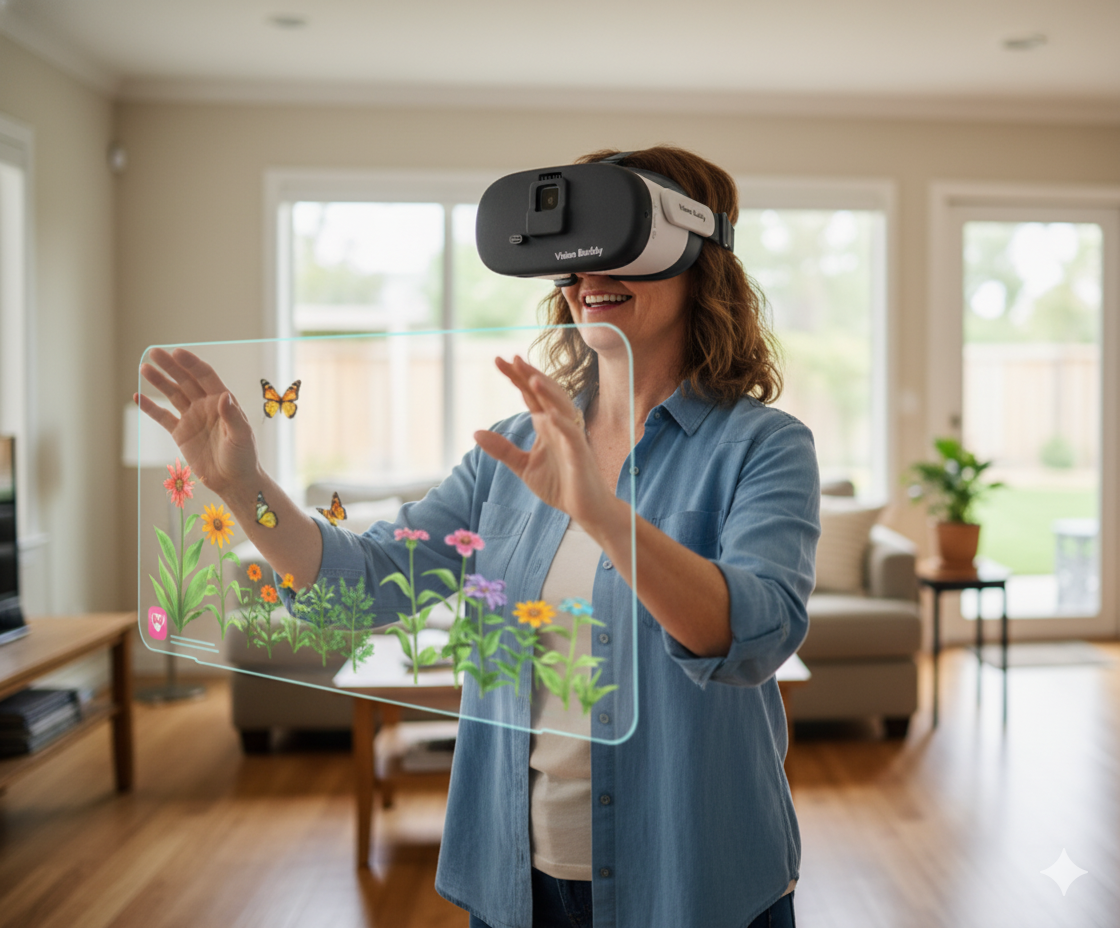
Vision Buddy AI glasses are not a single piece of technology.
They are an integrated system of hardware, software, and connectivity components that work together to deliver real-time visual enhancement for people with low vision.
This blog takes a detailed look under the hood at the specific technologies that power Vision Buddy, why each component matters, and how the combination produces a device capable of things that optical aids and simpler electronic devices simply cannot do.
Why the Technology Inside a Low Vision Device Matters
Shopping for any AI glasses for low vision without understanding the underlying technology is a bit like buying a car based on color.
The specification that matters for daily use is not what the device looks like or what the marketing says about it.
It is whether the hardware and software inside can genuinely deliver better vision for the specific tasks that matter most to you.
Low vision devices fail in the real world for predictable technological reasons.
Cameras with insufficient resolution produce images that are technically magnified but visually poor. Displays that cannot render fast-moving content create lag that makes TV watching frustrating.
AI systems that depend on cloud connectivity introduce latency that makes real-time enhancement feel sluggish.
Processing systems that cannot handle the computational demands of video enhancement in real time produce stuttering, inconsistent results.
Understanding what Vision Buddy actually uses and why those choices were made helps potential buyers evaluate whether the technology matches their needs, and helps existing users get the most out of their device.
The Sony AI Camera: Heart of the System
The camera is the foundation of any electronic low vision device.
It determines the quality of the raw visual input that the system has to work with, and that raw input quality is a ceiling on everything that follows.
No amount of AI processing can recover detail that the camera never captured.
Vision Buddy uses an upgraded Sony high-resolution AI camera with a 16-megapixel sensor.
Sony is a leader in imaging technology, and their camera sensors are used in professional and medical imaging contexts precisely because of their performance in demanding, detail-critical applications.
The camera includes autofocus capability, which is important for a device used across a range of distances and contexts.
Reading a book at arm’s length, watching a television across the room, and looking at a face nearby all require different focus distances.
Autofocus handles these transitions automatically, so the user does not need to manually adjust focus as they shift between activities.
The AI component of the camera goes beyond simple imaging.
It includes gesture recognition and object detection capability, meaning the system can interpret not just what the camera sees but what is happening in the scene and what the user is likely trying to do.
This enables more intelligent enhancement decisions than a camera that simply captures pixels without understanding them.
The 4K Display System
Capturing a high-quality image is only half the challenge.
Displaying it in a way that delivers that quality to the user’s eyes is the other half.
Vision Buddy uses a 4K display system with a resolution of 1832 by 1920 per eye.
The significance of 4K resolution in a close-proximity wearable display is different from what it means on a large television.
In a headset worn close to the eyes, higher resolution translates directly to sharper, cleaner images that are easier to process visually.
For someone with macular degeneration who is relying on a magnified image to compensate for lost central detail, the clarity of that magnified image is critical.
A lower-resolution display produces a magnified image that looks blocky and pixelated, which reduces the visual information available rather than enhancing it.
The 98-degree field of view in the VB 4 Max is a meaningful specification.
A narrow field of view creates a tunnel effect that makes wearable displays feel claustrophobic and visually limiting.
A 98-degree field of view is wide enough to feel relatively natural and allows users to take in more of their visual environment without having to move their head as much.
How the AI Processing Works
The AI processing in Vision Buddy AI glasses operates on several levels simultaneously. Understanding what each level does clarifies why AI-powered enhancement produces meaningfully better results than simple optical or digital magnification.
Scene Recognition:
The AI identifies what type of visual content is being viewed. Reading text requires different enhancement settings than watching a video. Looking at a face requires different processing than viewing a landscape. Scene recognition allows the system to apply context-appropriate enhancement automatically rather than using a one-size-fits-all approach.
Adaptive Magnification:
Rather than applying a fixed level of magnification uniformly, the AI adjusts based on what is being viewed and what the user is doing. This produces more natural and comfortable visual enhancement than static magnification.
Contrast and Edge Enhancement:
AI-driven contrast enhancement is more sophisticated than simply boosting overall contrast levels. The system identifies edges and boundaries in the image and selectively enhances them, making text crisper and objects more distinct without making the overall image look artificially processed.
Object Detection:
The AI camera’s object detection capability identifies specific types of visual content like text, faces, and objects in the environment. This enables features like automatic text enhancement when a printed document comes into view.
The TV Hub: Wireless Streaming Technology
The TV Hub is one of Vision Buddy’s most distinctive technologies and the component that sets it apart most clearly from other AI glasses for low vision.
No other wearable low vision device includes a dedicated wireless TV streaming system.
The TV Hub works by connecting directly to any existing cable box or streaming device via HDMI.
It then transmits the video signal wirelessly to the Vision Buddy headset.
The transmission is designed for low latency so that the audio and video remain synchronized, which is essential for comfortable TV watching.
Significant audio-video lag makes dialogue feel disconnected from lip movements and creates a disorienting experience that quickly becomes unwatchable.
The wireless nature of the connection means users are not tethered to a fixed position.
They can watch from a comfortable chair, move around the room, or even watch while lying down, all while receiving the enhanced TV feed directly to the headset.
For users with macular degeneration whose best remaining vision is peripheral rather than central, the ability to position the image optimally matters a great deal.
The system supports 1080p video quality in the standard configuration, which provides more than sufficient clarity for the visual enhancement that the headset then applies.
When the 4K display system processes and presents this signal, the result is a watching experience that approaches normal TV quality in terms of clarity and visual detail.
The CCTV Mini and Computer Link
Vision Buddy’s ecosystem extends beyond the headset itself through two additional hardware components that expand what the system can do.
The CCTV Mini is a stationary camera designed for desktop reading tasks.
It positions over a reading surface and transmits a real-time image to the headset, providing the kind of magnified reading view that desktop electronic magnifiers have traditionally delivered, but integrated with the Vision Buddy headset rather than displayed on a separate monitor.
This means users can read at a desk, review documents and mail, and work through books and newspapers using the same headset they use for TV watching.
Computer Link is the component that connects Vision Buddy AI glasses to PCs and tablets, displaying the screen content in enhanced, magnified form through the headset.
This is particularly valuable for users who need to continue working or maintaining computer-based activities despite vision loss.
Email, browsing, video calls, and document work all become manageable when the screen content is delivered directly to the eyes with appropriate magnification and contrast enhancement.
The VB Companion App and Other Modes
Hardware performance determines the ceiling of what a device can achieve.
Software configuration determines how close real-world performance comes to that ceiling for any individual user.
Users can adjust contrast levels, brightness, color filters, and reading-specific modes through the app.
These adjustments can be saved as user profiles, so someone who needs different settings for TV watching versus reading can switch quickly without reconfiguring from scratch each time.
A device used for multiple purposes becomes more integral to daily life than one with a single function.
Edge Computing vs Cloud: Why Vision Buddy Works Offline
One of the more significant technical decisions in Vision Buddy’s design is the choice to run AI processing on-device rather than relying on cloud connectivity.
This design philosophy has direct practical consequences for users.
Cloud-based AI processing means that the device sends data to remote servers, the servers perform the analysis and enhancement, and the results are sent back to the device.
This approach can leverage very powerful computing infrastructure but introduces latency, requires reliable internet connectivity, and raises privacy questions about what visual data is being transmitted and stored.
Edge computing means the AI processing happens on the device itself using dedicated on-board hardware. Vision Buddy uses this approach.
The result is that enhancement happens in real time without perceptible delay, the device works reliably without internet connectivity (which matters in many home environments), and the user’s visual data stays on the device rather than being transmitted to external servers.
For a device primarily used for watching television and reading in the home, the edge computing approach is the right choice. It delivers the responsiveness and reliability that daily use requires.
How the Hardware and Software Work Together
The power of Vision Buddy AI glasses comes not from any single component but from the integration of all these elements.
The Sony camera captures a high-quality image. The AI processing analyzes the scene and applies appropriate enhancement.
The 4K display presents the enhanced image with sufficient resolution to maintain clarity at close viewing distances.
The TV Hub delivers live television to this system with low-latency wireless transmission.
Each component is designed to work with the others, and each component choice reflects specific requirements of the low vision use case.
This coherent system design is what allows Vision Buddy to deliver reliably on its core promise: helping people with low vision watch TV, read, and manage daily tasks with greater independence and clarity.
Final Thoughts
Technology in AI glasses for low vision is advancing rapidly, and Vision Buddy’s choices reflect a thoughtful approach to what actually matters for daily low vision use.
The Sony AI camera, 4K display, on-device AI processing, dedicated TV Hub, and optometrist-developed companion app are not arbitrary feature selections.
They are the result of specific design priorities: real-world performance for home-based activities, ease of use for a non-technical audience, gives both users and eye care professionals confidence in the system.
Understanding this technology helps users make better decisions about whether the device is right for them, configure it more effectively for their specific needs, and get the most from the substantial capability that the system delivers.